
INDIA · UPI GUIDE
Buy USDT with UPI in India
From finding a UPI offer to receiving USDT in your QikCrypto balance.
Find a seller that accepts UPI
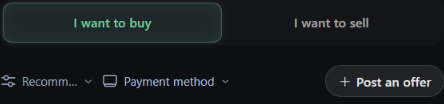
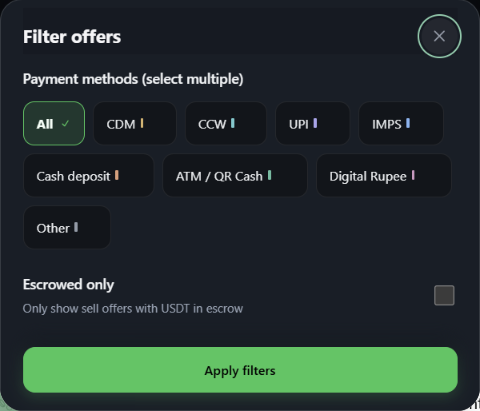
Open the QikCrypto Mini App. From Home, tap I want to buy to see seller SELL ads. Open Payment method, choose UPI, and tap Apply filters. Open an ad and check its INR price per USDT, available quantity, and minimum and maximum order amounts. Each seller sets the range for their ad.
Enter your amount and review the preview. Check the INR amount, fee, USDT you’ll receive, and order terms. Confirm that UPI is listed on the ad, then tap Contact seller, enter your amount, choose UPI and send the chat request.
The ad owner has 30 minutes to respond. In the chat, both of you send at least one message and confirm the terms. Then tap Start trade. This is the step that creates the order; a request or a chat on its own is not an order.
Wait for escrow, then pay
Go to Orders and open your current order. The seller has 30 minutes from order creation to fund the full USDT amount in escrow. Wait for full escrow before using the order’s payment details. Full escrow starts your 30-minute payment window. You can get one 30-minute extension with the seller’s consent.
Tap Pay now. Before authorizing the transfer, match the UPI ID, payee name, exact INR amount, and payment method against the order details. Pay from your own account and check any same-name requirements in the order. If anything differs, pause and use SafeChat in the order. Add a payment remark only if both parties agree to it in the order and it is lawful.
Save the UTR and payment status. Tap I have paid only after your payment app or bank confirms the transfer succeeded.
Receive your USDT
The seller checks that the INR arrived and can then release the USDT. The order may release automatically 60 minutes after you tap I have paid, provided there’s no dispute or support freeze. You can dispute an order after marking it paid. A dispute immediately freezes the order and the USDT pending review.
Released USDT appears in your Mini App balance. External withdrawal is a separate step. The published withdrawal rules list BSC (BEP20) as the supported network. TRON and Ethereum withdrawals are closed.
Fees and limits
QikCrypto charges a 0.2% trade fee to one side only: the person who starts the trade from someone else’s ad. The ad owner pays no trade fee. This is the same whether you are buying or selling. Example: you open a seller’s ad and buy 100 USDT. The fee is 0.2 USDT and 99.8 USDT reaches your balance. If you post your own ad and another trader responds, your trade fee is 0.
Withdrawals use BSC (BEP20). The withdrawal fee is 0 USDT and the minimum withdrawal is 5 USDT. Minimum and maximum order sizes are set by each ad. Figures checked on 11 November 2026; your order preview shows the exact amounts for your trade.
Frequently asked questions
Can I buy USDT with UPI on QikCrypto?
Yes, when the seller offers UPI for your selected order. Check the method in the order before paying.
What happens if an order timer runs out?
A chat request expires after 30 minutes if the ad owner doesn’t respond, and no order is created. After Start trade, the order ends unpaid if the seller misses the escrow deadline or the buyer misses the payment deadline. If you already sent money or your payment status is unclear, keep the UTR and status and contact order support and your payment app or bank before attempting another transfer.
What if my UPI payment is pending but my account was debited?
Avoid a second transfer. Save the UTR and payment status, then contact order support and your payment app or bank. Wait for confirmation that the transfer succeeded before marking it paid.
What if I sent money to the wrong UPI ID?
Contact your payment app or bank and order support promptly. Keep the UTR, recipient details, and payment status. NPCI says an initiated UPI payment cannot be stopped. Avoid sending a second payment while you check what happened.
What if the seller asks me to switch from UPI to IMPS?
Pause the payment. Check the method shown in the order and raise the mismatch in SafeChat or with order support before transferring any money.